1. Aid for the deaf
I wanted to make this for my dad who is deaf and has trouble understanding people when he is at the store. How to use it: 1. talk into the app 2. the message will appear on the LED screen


Step 1: Arduino Software and the LED screen (tinkercad)

#include <LiquidCrystal.h>
#include <SoftwareSerial.h>
LiquidCrystal lcd(13, 12, 11, 10, 9, 8);
SoftwareSerial EEBlue(5, 6);
void setup() {
Serial.begin(9600);
lcd.begin(16, 2);
lcd.clear();
EEBlue.begin(9600);
Serial.println("The bluetooth gates are open.\n Connect to HC-05 from any other bluetooth device with 1234 as pairing key!.");
}
void loop () {
lcd.setCursor(0,1);
lcd.print(millis()/1000);
if (EEBlue.available()) {
lcd.setCursor(0,0);
lcd.print(EEBlue.readString());
}
if (Serial.available()) EEBlue.write(Serial.read());
}

Step 2: Creating the APP (Android) (appinventor)


Step 3: 3D Printing the Case
(tinkercad)


Link to Instructable:
https://www.instructables.com/id/Aid-for-the-Deaf
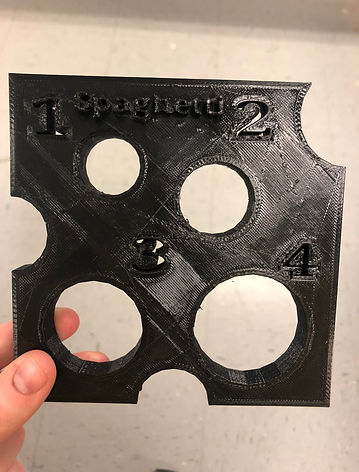
2. Spaghetti Measurer

I thought this spaghetti measurer would be fun to recreate and make it look like swiss cheese. I used tinkercad to make the 3D plan.
Each portion is a separate measurment:
1 porton- 23mm (7/8 inch) diameter
2 portons- 29mm (1- 1/8 inch) diameter
3 portons- 38.5mm (1-1/2 inch) diameter
4 portons- 45mm (1- 3/4 inch) diameter